
Testing, Scenarios & Performance
With entities, composite screens, state transitions, and action point rules wired together, Scenario Studio and the Performance & Volume Lab verify behavior end to end against real databases before any change is published.
1. Multi-Step Verification in Scenario Studio
Open Object Browser -> Operations & Quality -> Testing to create or run declarative scenarios grouped into risk-aligned packs (Core Domain Workflows, RBAC & Compliance, State Machine Lifecycles, Custom Logic & Action Points):
- Three-Column Step Builder (
AS·WHEN·THEN): Configure acting persona (asRole, optionalasUserandasTenant), REST endpoint (GET,POST,PUT,DELETE) with JSON payload and${savedVar.id}step chaining, expected HTTP status,saveAsoutput capture, and JavaScript invariant assertions (record.status === 'Triaged',items.length >= 1). ▶ Dry-Run on Studio DB: Executes every step live against your local SQLite database, measuring per-step response times (201 OK · 33ms) and flagging status or invariant mismatches inline.🔴 Record(Live Scenario Recording): Arms the Live Recorder so clicks, bookings, and updates performed on any Preview Mode screen append automatically as structured steps with clean variables.
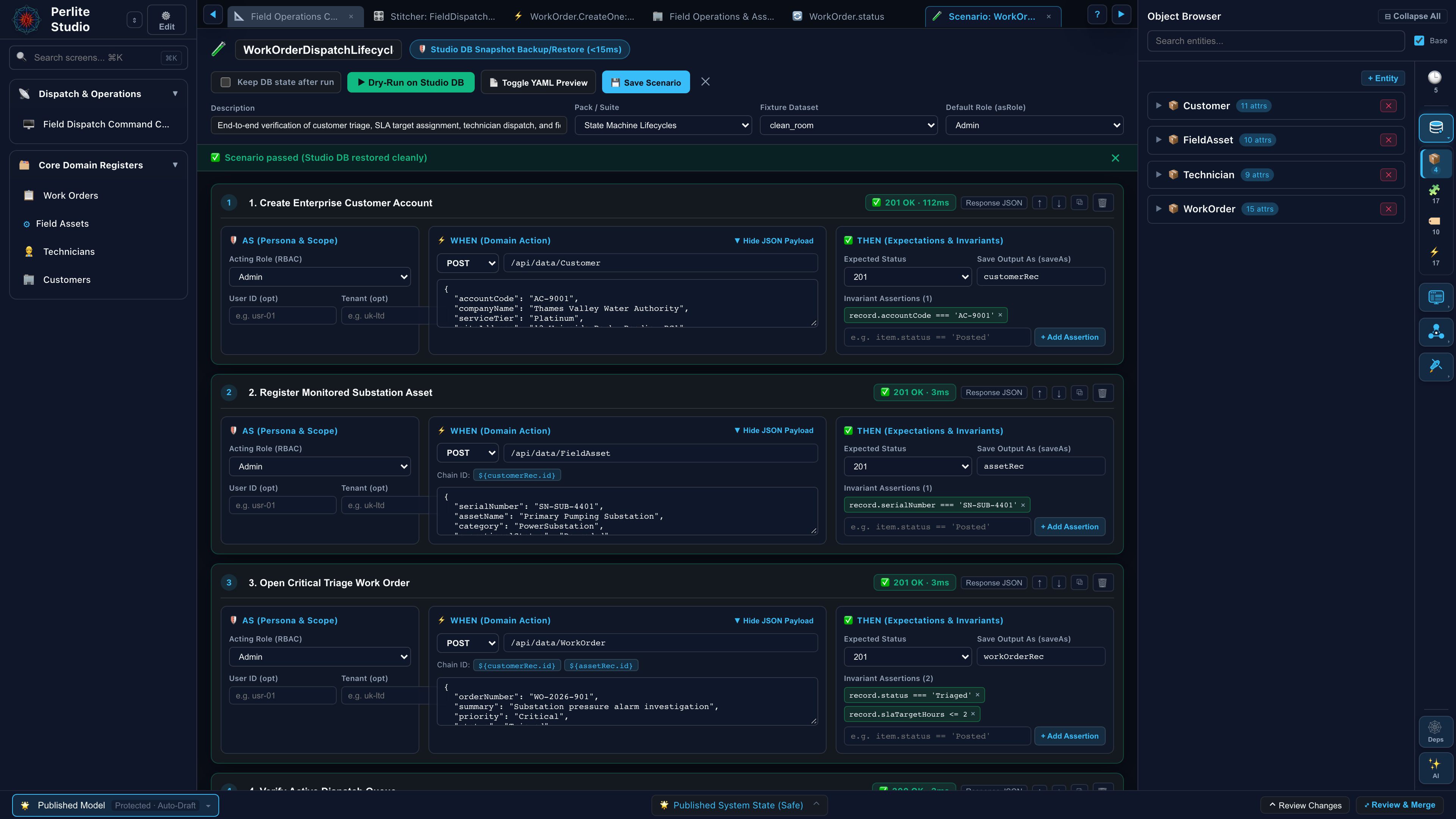
Scenario Studio running WorkOrderDispatchLifecycle with persona scoping, chained ID tokens, and inline step assertions.
2. Baseline Datasets, Snapshot Restore & Vault PII Scrubbing
Scenario Studio pairs repeatable test execution with strict data hygiene:
- Automatic Studio DB Snapshot Restore (
<15ms): By default (Keep DB state after rununchecked), Studio takes an instant binary snapshot prior to execution and restores SQLite cleanly when the scenario finishes, keeping your working dataset clean across repeated runs. - Fixture Datasets (
clean_room& Sample Packs): Bind any scenario to an emptyclean_roombaseline or a rich named dataset (FieldOpsDemo,ClinicalCareDemo) so workflows run against known relational preconditions. - PII-Scrubbed Vault Snapshots: When capturing representative datasets from active environments via Studio Operations, the Vault engine automatically tracks foreign-key integrity and scrubs fields marked
PII,PCI,Confidential, orePHIbefore storing reusable dataset packs or exporting Postgres SQL.
3. Performance Advisory, 1-Click Optimizer & Volume Lab
Perlite inspects query patterns and endpoint throughput at design time so bottlenecks surface early:
- Performance Advisory & 1-Click Optimizer: Whenever a Grid, Calendar, or Kanban binding in Screen Stitcher filters or sorts on unindexed attributes, or joins heavy relations, Flow Inspector displays a
Performance Advisorybadge. Click it to open the 1-Click Optimizer, add a B-Tree Index directly onto the target entity, or generate a Computed / Materialized View (Scheduled,OnCommit, orOnDemandrefresh) and rebind the panel in one click. - Performance & Volume Lab (
Object Browser -> Performance): Open any target environment to inspect table data volumes, shape read/write Workload Mix and Expert Mixer weights, generate parameterized k6 benchmark scripts, and validate p95 response latency before deploying.