
Action Point Logic Studio & Custom TypeScript
Generated CRUD pipelines, state transitions, and composite screen panels already handle persistence, validation scaffolding, tenant isolation, and routing automatically. Action Point Logic Studio lets you inject domain-specific rules — from SLA enforcement and derived calculations to relational updates and custom TypeScript algorithms — cleanly into named lifecycle hooks.
1. Lifecycle Hooks Across Backend Services, Transitions & Screens
Every service operation, state transition, and composite panel exposes predictable Action Points where your custom logic executes:
- Backend Service Hooks (
CreateOne,UpdateOne,DeleteOne,FetchOne,FetchMany,ExecuteAction):- Pre-Transaction:
ON_REQUEST_INIT,ON_AUTHORIZE,PRE_VALIDATE,POST_VALIDATE - In-Transaction:
PRE_CREATE,PRE_UPDATE,EXECUTE,PRE_CHILD_CREATE,POST_CREATE,POST_UPDATE - Post-Commit:
AFTER_COMMIT,ON_SUCCESS,ON_FAILURE
- Pre-Transaction:
- State Transition Hooks (
TransitionState):ON_REQUEST_INIT,ON_AUTHORIZE,PRE_VALIDATE_STATE,POST_VALIDATE_STATE,PRE_TRANSITION,POST_TRANSITION,PRE_EMIT_TRIGGER,POST_EMIT_TRIGGER,ON_SUCCESS,ON_FAILURE. - Screen & Panel Hooks:
EVALUATE_ACTION_STATE(compute dynamic visibility and disabled state per record),ON_AFTER_OPEN,ON_BEFORE_CLOSE,ON_AFTER_CLOSE, and custom toolbar or row⚡panel actions.
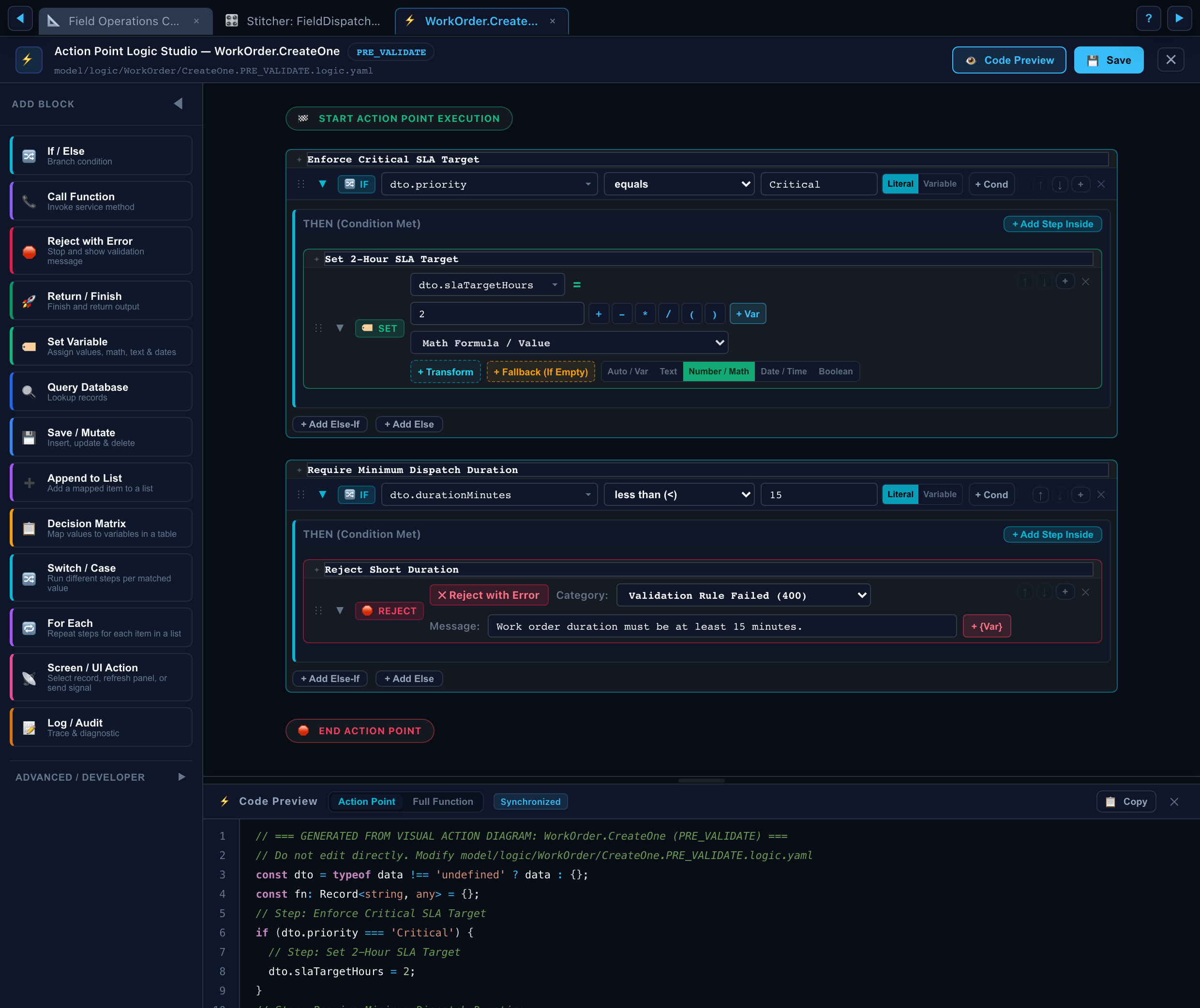
Action Point Logic Studio displaying the Add Block palette, WorkOrder.CreateOne PRE_VALIDATE steps, Literal/Variable selectors, and live Code Preview.
2. Visual Add Block Palette & Schema-Aware Variable Picker
Click ⚡ Visual Editor on any hook inside Object Browser, Diagram Entity Cards, State Inspector, or Screen Stitcher to assemble flows from the Add Block palette (StudioPalette):
| Construct | Category | Purpose |
|---|---|---|
If / Else |
Branching | Evaluates comparisons, null checks, or string checks to branch into then or else paths. |
Switch / Case & Decision Matrix |
Branching & Lookup | Dispatches multi-branch flows per value (Switch / Case) or maps structured condition tables to variables (Decision Matrix). |
For Each |
Iteration | Iterates over related collections (record.lineItems) or query results with scoped item and rowNumber bindings. |
Set Variable & Append to List |
Data & Math | Assigns fields or local variables using formulas, string helpers (+ Transform), date arithmetic, or builds mapped arrays. |
Query Database & Save / Mutate |
Persistence | Queries related entities with filters and sorting, or inserts, updates, and deletes records inside the active transaction. |
Call Function & Screen / UI Action |
Orchestration | Invokes another service method (FunctionCall) or emits signals and panel refreshes in Screen Action Points (EmitSignal). |
Reject with Error, Return / Finish & Log / Audit |
Outcome & Trace | Stops execution with structured validation errors (ExitFlow), returns early (ReturnResult), or writes diagnostic/audit trace entries (LogMessage). |
Every input slot pairs Literal | Variable mode toggles with the expandable Treeview Variable Picker (+ {Var}), organizing valid references by scope (Input incoming dto payload, Record persisted fields and parent relations, Local / Saved temporary variables, Loop active loop item, User authenticated user claims, Signal active screen signals, and System date/context helpers) so references match live schemas continuously.
3. Custom TypeScript Blocks & Protected Code Weaving
Whenever a calculation requires multi-step custom algorithms, third-party SDK calls, or specialized library imports:
- Expand
Advanced / Developer -> TypeScript Codein the Add Block palette to place an inlineTypeScript Codestep anywhere inside your visual flow. - Inspect the live bottom Code Preview drawer inside Studio to see the exact generated TypeScript output updates as you assemble blocks.
- During compilation, the Perlite Compiler weaves visual flows and custom TypeScript cleanly between protected
// === PERLITE_ACTION_POINT: [HOOK] ===markers using AST traversal (ts-morph) — preserving every custom line whenever entities, traits, or screens recompile.