
Business Capability Mapping & Domain Interactions
Every resilient application starts with clear boundaries before individual tables or UI screens take shape. Business Capability Mapping lets you structure what the organization does across Level 1 and Level 2 capabilities, score maturity and risk, connect capabilities directly to domain entities, and design cross-domain interactions inside Perlite Studio.
1. Capability Mapping Views in Studio
Open any capability map from Object Browser -> Architecture & Integration -> Capabilities, or click + New in the Capability Studio header to start a capability model:
▦ All(Split Tripartite View): Combines all three perspectives in one coordinated canvas — Block Diagram (Matrix) on the upper left, Radial Topology (L1/L2with entity and flow toggles) on the upper right, and the interactive Capability Spreadsheet / Entity Mapping tabs across the bottom.🏢 Block(Block Diagram Matrix): Focuses on draggable Level 1 domain containers and nested Level 2 capabilities for workshops and structural reorganization.🕸️ Network(Radial Topology): Visualizes enterprise-to-capability-to-entity relationships as an expandable graph with zoom and fit-to-view controls.📋 Table(Bulk Maintenance Grid): Edits capability names, descriptions, PACE layers, CMMI scores, risk levels, and linked entities inline across every row at once.
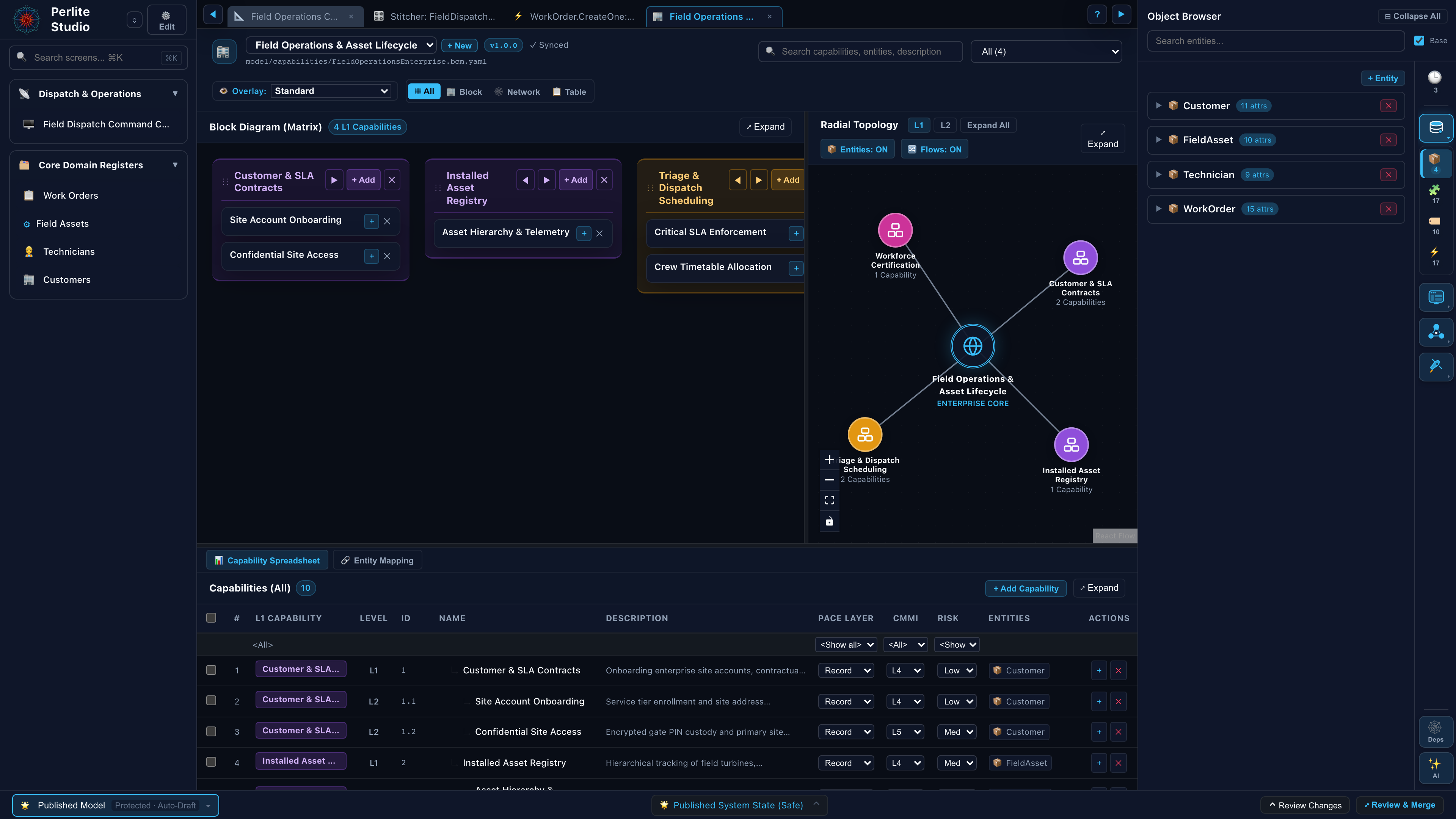
Capability Studio in Split Tripartite mode showing Level 1 and Level 2 capabilities mapped directly to domain entities.
2. Strategic Overlays & Entity Linking
Switch the Overlay selector in the Capability Studio header to recolor every capability block, topology node, and spreadsheet row by architecture lens:
| Overlay Mode | What It Highlights |
|---|---|
Standard |
Clean domain color grouping across top-level capability areas. |
💻 Software Realisation |
Distinguishes capabilities implemented natively in Perlite (perlite), integrating with external tools (third-party), or planned (not-implemented). |
📊 CMMI Maturity |
Scores operational readiness from L1 through L5 across each capability node. |
⚡ Gartner PACE |
Classifies capabilities into System of Record, System of Differentiation, and System of Innovation. |
🛡️ Risk & Audit |
Surfaces Low, Medium, High, and Critical compliance and operational risk tiers. |
Switch the bottom workspace tab from Capability Spreadsheet to Entity Mapping whenever you want to bind domain entities directly to a capability row, ensuring every capability points to concrete runtime data structures.
3. Cross-Domain Interactions, Interfaces & Dependencies
As domains grow across bounded contexts, three companion Studio views coordinate integration and blast-radius visibility:
- Domain Interactions (
Object Browser -> Interactions): Map event-driven and API exchanges between source and target capabilities, binding triggering functions to explicit payload contracts. - Service Interfaces (
Object Browser -> Interfaces): Inspect and standardize published operation signatures and event interfaces such asEventAuditableor ledger posting contracts across suites. - Dependency Explorer (
Object Browser -> Deps): Trace incoming and outgoing references across capabilities, entities, screens, state machines, and logic hooks before renaming or refactoring any artifact.