
State Machines, Custom Types & Panel Actions
Domain entities often follow strict operational lifecycles — work orders moving from triage to on-site completion, or clinic appointments progressing from scheduled booking to checked-in consultation. State Machine Studio, Custom Domain Types, and Panel Action Buttons enforce those rules consistently in both backend endpoints and frontend controls.
1. Lifecycle Statecharts in State Machine Studio
Mark any String or enumerated attribute with the State governance badge in the ERD Entity Card or Object Browser -> Architecture & Integration -> State Machines to open its Lifecycle Statechart:
- Initial & Terminal States: Designate the entry state (
INITIAL) and one or more completion states (FINAL->END), styled with distinct color badges (blue,amber,purple,indigo,emerald,rose). - Auto-Layout & Custom Positioning: Toggle between
⇄ Horizontaland vertical flow orientations, click⚡ Auto-Layoutfor instant topological arrangement, or drag state nodes into custom positions (saved automatically withUndo/Redosupport). - Add Transition & Multi-Origin Support: Click
+ Add Transitionor drag between state handles to connect one or multiple allowed origin states to a destination state.
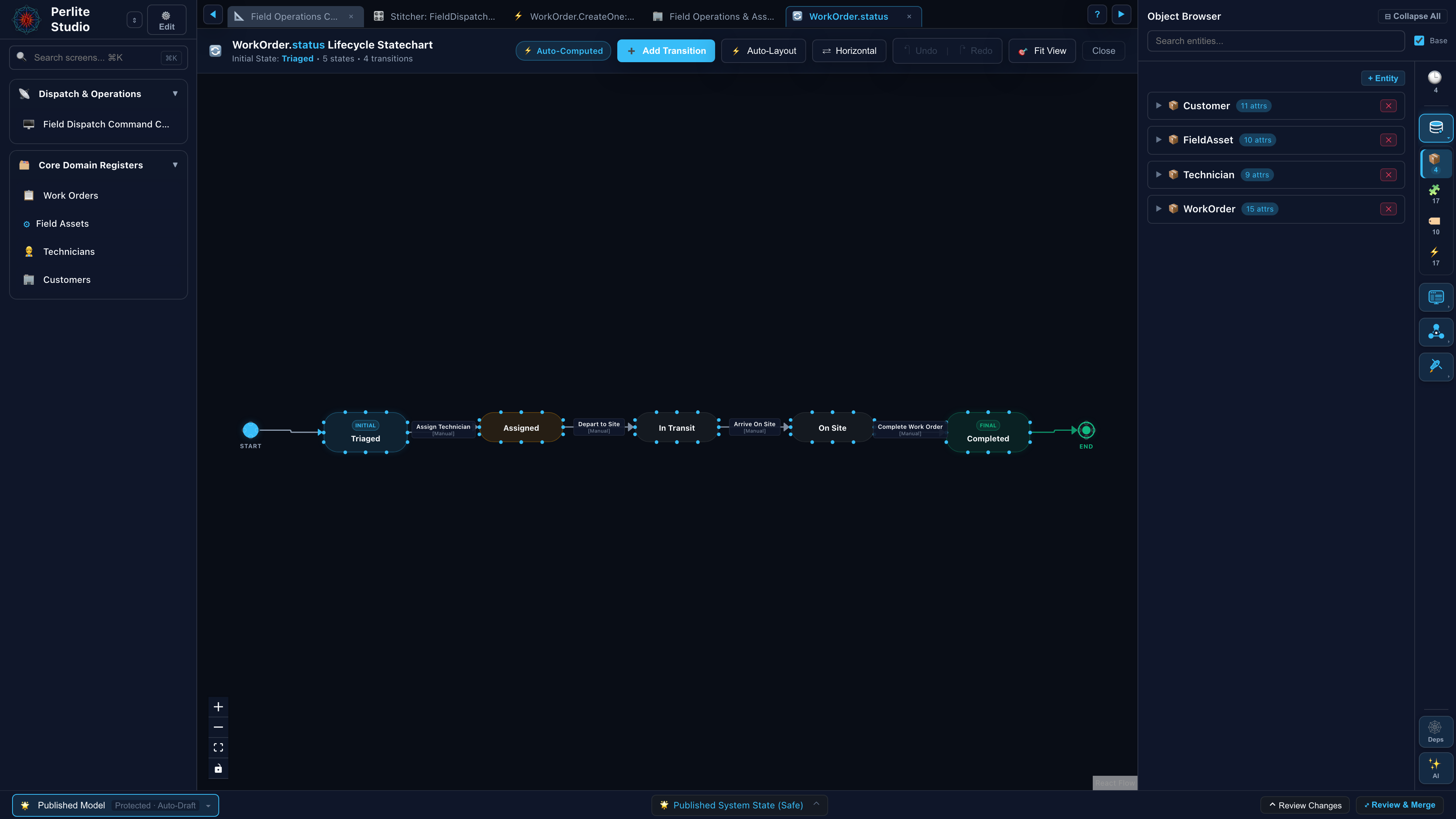
WorkOrder.status Lifecycle Statechart showing initial state Triaged, four guarded transitions, and terminal state Completed.
2. Transitions, Role Guards, Payloads & Emitted Triggers
Select any transition edge on the statechart to configure its execution contract inside the State Inspector Drawer:
- Trigger Modalities: Combine
Manual(button click or API action),Schedule(time-based automation such as no-show detection), andEvent(triggered by another entity). - Allowed Origin States & Destination State: Select one or more valid source states (
[Scheduled, CheckedIn]->Cancelled) and enforce valid state paths across backend mutations. - Role Guards (
guards.roles): Restrict who can execute each transition (Dispatcher,Practitioner,Technician,Receptionist,Administrator). - Required Transition Payloads: Prompt for mandatory contextual fields on transition — such as
resolutionSummarywhen completing a work order orcancellationReasonwhen cancelling an appointment. - Emits Interface Trigger & 10 Lifecycle Action Points: Emit downstream events (
WorkOrder.Completed,Appointment.Completed) viaemitsTriggerand attach custom rules to any of the transition’s 10 action points (ON_REQUEST_INIT,ON_AUTHORIZE,PRE_VALIDATE_STATE,POST_VALIDATE_STATE,PRE_TRANSITION,POST_TRANSITION,PRE_EMIT_TRIGGER,POST_EMIT_TRIGGER,ON_SUCCESS,ON_FAILURE).
3. Reusable Custom Types, Panel Actions & Application Menu
Three companion tools finish the interactive experience around lifecycles:
- Custom Domain Types (
Object Browser -> Data & Domain -> Types): Author reusableScalartypes (decimal precision/scale, min/max bounds, regex patterns, placeholders, display formats) andEnumtypes (coded option lists with color pills such asDispatchPriorityorOrderStatus) so entities and form inputs share one domain contract. - Panel Action Buttons (
EVALUATE_ACTION_STATE): Add custom toolbar or row action buttons directly onto grids, Kanban cards, calendars, or drawers in Screen Stitcher. Bind each button to a state transition, custom service function, or signal flow, and control visibility/disabled state per record usingEVALUATE_ACTION_STATE. - Application Menu Designer (
Application Menu -> ⚙️ Edit): Organize navigation groups and sidebar ordering cleanly, mapping role visibility and quickCmd+Kcommand search across every composite screen and entity register.